How to Shoot Green Screen in a Rental Studio: A Clean Key Is Decided on Set, Not in the Edit
Green screen (or chroma key) works by filming someone in front of a solid green or blue backdrop, then removing that one color in editing and dropping in a new background. Almost every editing app now has a chroma key button, including free phone apps like CapCut, so it looks like a one-click job.
Then you try it, and the same problems show up. Strands of hair get chewed off. A green outline clings to the shoulders. One corner of the backdrop refuses to disappear. You can push the sliders in your editor all evening and it barely helps, because the problem was baked in when you filmed. A keyer only removes "that color." If the backdrop isn't one even color, or if green has bounced onto the person, the software either leaves it behind or eats into the subject along with it.
This guide is for anyone renting a studio to shoot green screen for the first time: a YouTube talking-head, a recorded lecture, an interview, a product clip, or a portrait you want to place on a different background later. The principles are the same for video and stills. Follow them in order.
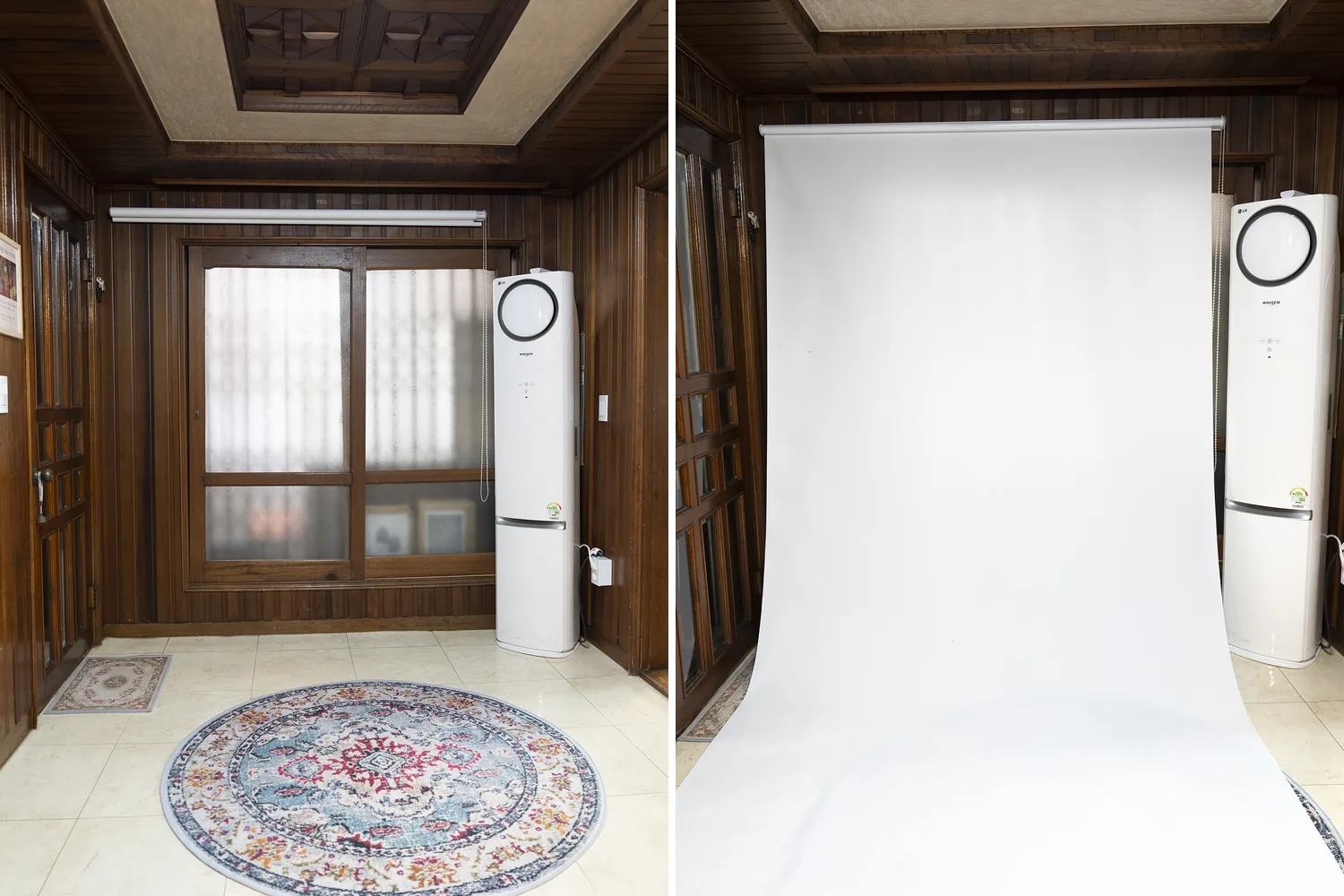
The backdrop corner at Botong Lee Studio: the roll retracted (left) and a white backdrop pulled down onto the floor (right). For full-body shots, your screen needs to sweep down onto the floor like this.
1. Choose the replacement background before you shoot
If you film first and pick a background afterward, the result tends to look pasted on. The light on the person comes from one direction and the light in the background from another, and the camera height doesn't match the scene.
So reverse the order. Pick the background first, then shoot to match it. Look at three things in the background image:
- Where the light comes from. If the window or sun in the background is on the left, put your main light on the subject's left too.
- What height it was shot from. An eye-level background needs the camera at the subject's eye level. A background shot from above needs the camera slightly higher.
- How much of the person will show. Decide now between waist-up and full body.
For a first attempt, go waist-up. Full body means the screen has to run unbroken from the wall onto the floor, and you'll also have to remove the shadow under the feet, which is far harder. Talking-head videos, lectures, and interviews rarely need more than waist-up anyway.
2. Pick green or blue around your wardrobe
Chroma key backdrops are green or blue because those colors sit furthest from human skin tones.
- Green is the default. Camera sensors record green brightly and cleanly, so you can get a clean key with less light.
- Blue is for when green has to be in the frame, such as a green outfit or plants. Blue that bounces onto the subject is also less noticeable. The trade-off is that blue needs more light.
The practical order: find out which color screen the studio has, then choose clothes that don't match it. If you plan the outfit first and discover on the day that it matches the screen, that outfit will vanish into a hole on camera.
3. Light the screen and the subject separately
Lighting is where most green screen shoots fail. With a single light covering both the person and the screen, the center of the screen ends up bright and the edges dark. Your keyer sees bright green and dark green as different colors, so one part disappears and the other stays.
Give each light one job:
- Two lights on the screen, one from each side at an angle, broad and soft, so the whole backdrop is the same brightness.
- One key light on the subject, from the direction you chose in step 1.
- A back light if you have one, placed behind and above the subject to outline the hair and shoulders. It separates hair from the screen and covers green that has bounced onto the shoulders.
Keep the screen about as bright as the subject or slightly darker. Over-lighting the screen bounces green onto the edges of the person. To check evenness, film just the empty screen on your phone. If one corner is clearly darker, move the light on that side.
Wrinkles in the backdrop cast tiny shadows that turn into blotches after keying. Pull fabric backdrops taut and make sure the part touching the floor isn't folded.
For video, use continuous lights. Strobes only fire at the moment of exposure, so they work for green screen photos but not for video.
If the room has windows, cover them and work with artificial light only. Daylight shifts in brightness and color as the hours pass, so two clips filmed with identical settings can end up with different shades of green, and you'll be re-tuning the key for every clip.
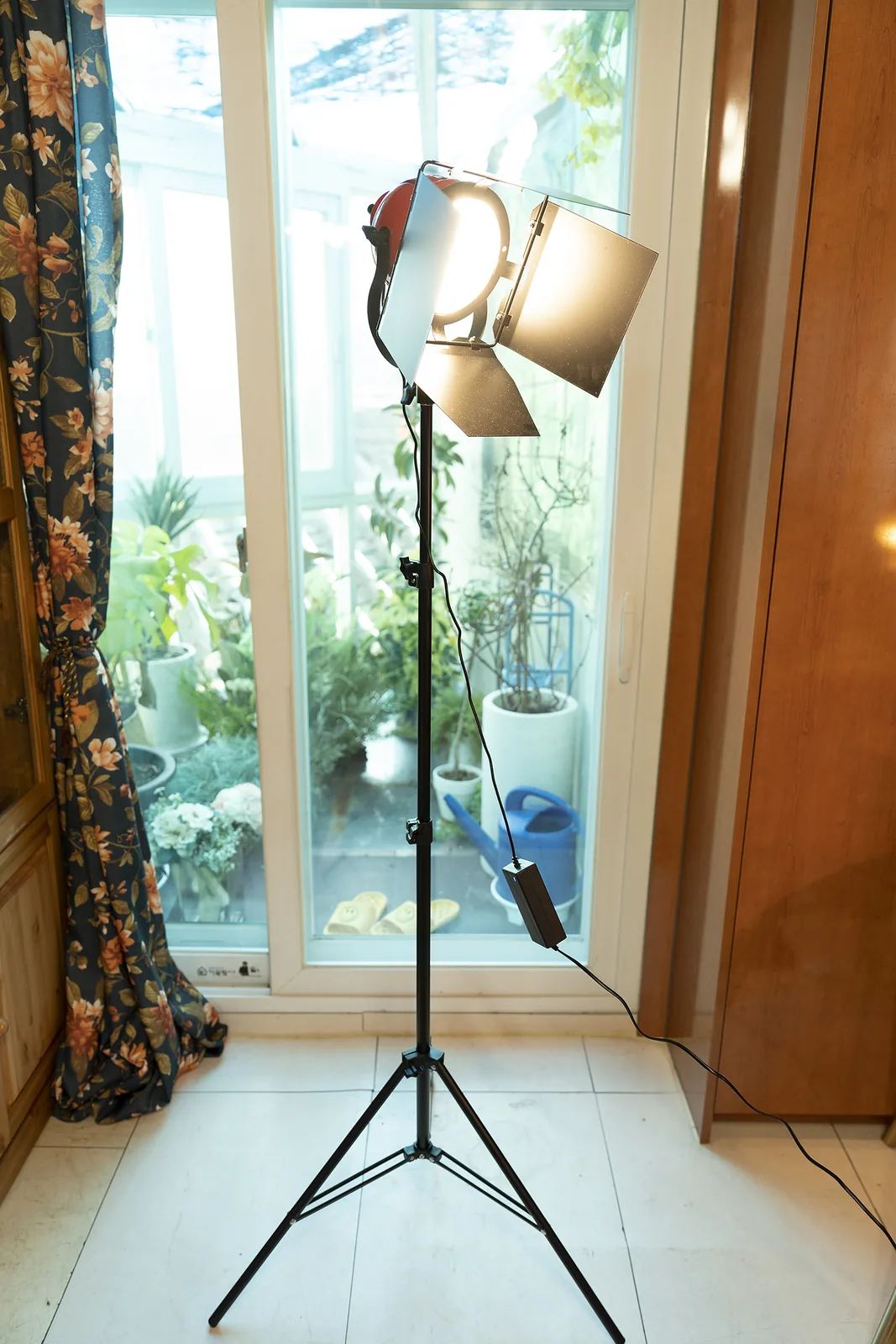
A stand-mounted continuous light at Botong Lee Studio. Video needs lights that stay on, like this one.
4. Keep the subject well away from the screen
Standing right in front of the screen causes two problems. The subject's shadow falls on the backdrop, and green light reflecting off the screen spills onto the shoulders and hair. The shadow makes the screen uneven, and the spill makes the keyer trim away the subject's edges.
Leave at least 1.5 to 2 meters (about 5 to 6.5 feet) between the subject and the screen. Add the distance from the subject to the camera and you need real depth: 2 meters from screen to subject plus 2 to 3 meters to the camera means 4 to 5 meters from the backdrop wall to the camera. That's why it's worth asking a studio how much floor you can use in front of the screen.
Short on depth? Frame tighter. The less screen in the shot, the easier it is to light evenly.
5. Leave anything that reflects or matches the screen at home
Filter wardrobe and props by two questions: does it match the screen, and does it reflect?
- Same color family as the screen. Skip greens, lime, and mint on green; skip blue, including denim, on blue.
- Shiny materials. Satin, sequins, and metal jewelry mirror the screen color, and those spots get keyed out.
- Sheer fabric. See-through layers and fine lace let the screen show through and turn into holes.
- Very fine stripes and small checks. The pattern shimmers on camera and makes edges messy.
- Flyaway hair. This is the hardest thing to key. Smooth or tie hair back to reduce loose strands.
- Glasses and glass props. Lenses and glassware reflect the screen. If you wear glasses, adjust your head angle until the screen stops showing in the lenses.
6. Turn off "auto" and lock the camera
On auto, the camera keeps re-adjusting brightness and color as the subject moves. The green shifts from moment to moment, and no single key setting works for the whole clip.
- Lock exposure, white balance, and focus. On a phone, press and hold on the subject's face to lock exposure and focus.
- Turn off portrait mode, background blur, and beauty filters. These features smear the subject's outline, and a smeared outline keys badly.
- Raise the shutter speed a little for lots of movement. Fast hand gestures blur, and blurred edges mix with green that stays behind after keying.
- Mind the mains frequency. Korea runs on 60Hz power, so shutter speeds like 1/60 or 1/120 second avoid light flicker. If you're used to shooting at 1/50 in a 50Hz country such as the UK, much of Europe, or Australia, switch before you roll, or you may see banding under LED lights.
- Record at the highest quality your camera offers. Heavy compression turns edges into jagged steps.
7. Shoot ten seconds and key it before the real take
Once everything is set up, don't go straight into the real take. Film about ten seconds and key it right there, on a laptop editor or a phone app like CapCut.
Check three places: the edges of the hair, the outline of the shoulders and arms, and the corners of the screen. If green remains or the body gets chewed away, adjust the lights or the distance and test again.
Skip this and find the problem at home, and your only fix is to rent the studio again and reshoot. Green screen needs several lights, so setup takes longer than an ordinary self-shoot. When you book, count setup, testing, and pack-down time, not just filming time.
What to ask before you book any studio
- The color of the chroma key backdrop (green or blue), its width, and whether it runs onto the floor
- How many continuous lights there are. You need at least three: two for the screen, one for the subject
- How many meters you can use in front of the screen
- Whether the windows can be covered
- The condition of the backdrop (wrinkles)
- Background noise, if you're recording sound
Shooting at Botong Lee Studio
Botong Lee Studio has a dedicated chroma key backdrop. It also has a large white backdrop cloth and colored paper backdrops in red, yellow, green, and black, but note that the green colored backdrop is a photo backdrop, not a chroma key screen. If you plan to key out the background, use the chroma key backdrop. When you book, tell us whether you're shooting waist-up or full body and how many people are coming, so you can confirm the backdrop size and lighting setup in advance.
Strobes, continuous lights, backdrops, and props are included at no extra charge. There are tripods too, but their mounts may not fit every camera, so bring your own if you can. For stills, bring a flash trigger and remote that match your camera brand.
Hourly rental is 15,000 won per hour for two people, plus 5,000 won per hour for each additional person, with a two-hour minimum. For a video shoot, that works out like this:
- 2 people, 3 hours (one person presenting a lecture, one helping with the camera): 15,000 won × 3 hours = 45,000 won
- 3 people, 3 hours (two interviewees and one camera operator): (15,000 + 5,000 won) × 3 hours = 60,000 won
Crews that need the whole day can book a package instead. All Day runs 9 a.m. to 7 p.m. (10 hours) for 250,000 won, and All Night runs 7 p.m. to 9 a.m. the next morning (14 hours) for 300,000 won. Packages cover up to 15 people, cast and crew combined, with 10,000 won per extra person and a maximum of 20. A 100,000 won deposit is returned after the space is checked at the end of the shoot.
At the hourly rate, ten hours for four people also comes to 250,000 won, the same as All Day. From five people up, the package is cheaper. The package details are in our post on renting the whole house as a film location.
If you're recording dialogue or a lecture, the dog that lives upstairs may bark briefly when the front door opens and closes. Start recording once everyone is in and things have settled, and mention it when you book if clean sound matters. Night and early-morning shoots are possible, but this is a residential street, so please keep noise down late at night.
The studio is the ground floor of a detached house about a five-minute walk from Exit 3 of Hansung University Station (Line 4) in Seongbuk-gu, Seoul. Your team has all 17 pyeong (about 56 square meters) to itself. If you drive, the resident parking spot out front has to be vacated whenever the resident calls, so we recommend the Samseon-dong public parking lot. Full pricing and cancellation terms are on the studio page.
Booking information
Book or ask about Botong Lee Studio
For a green screen shoot, tell us waist-up or full body, how many people, and whether you're recording sound.
Quick recap
- Pick the replacement background first and match its light direction and camera height. Start with waist-up.
- Check the studio's screen color, then choose clothes that don't match it.
- Two lights on the screen, one on the subject, lit separately. Light the screen evenly and cover the windows.
- Keep 1.5 to 2 meters between subject and screen.
- Leave matching colors, shiny or sheer fabrics, flyaway hair, and lens reflections out of the frame.
- Lock exposure, white balance, and focus. Turn off portrait mode. In Korea, use 1/60 or 1/120.
- Run a ten-second test key and check hair, shoulders, and screen corners before the real take.
Services by Botonglee