How to Write a Garment Work Order the Factory Won't Have to Call You About
When people get ready to have clothes made for the first time, one of the first things they ask me is whether I have a work order template. In the fashion world you will also hear it called a tech pack or a spec sheet. Templates are easy to find online. But two people can fill in the exact same template and get very different results: one gets a string of calls from the factory asking what they meant, the other gets the garment they had in mind.
I have designed clothes and managed production for fifteen years, and I have written a lot of work orders. My denim work orders alone fill a folder with well over a hundred files. What all that writing has taught me is simple. A work order is a page that answers the factory's questions before the factory has to ask them. If every answer is on the page, it does not matter whether you made it in Excel, in Word, or by hand.
When you write it
In the order of things, you write the work order after you have chosen the fabric and trims and before you send the pattern out. My own sequence goes like this: research fabrics that suit the garment, collect swatches, pick the fabric and trims for the sample, write the work order, set the size specs, have the pattern made, and then hand the sample to a sample room or a factory whose sewing price fits the job.
When the sample comes back, we meet, decide what needs to change, add those changes to the work order and send it on to bulk production. So a work order is not something you write once. You write it before the sample, and you revise it after you have seen the sample.
Two work orders I actually used
Below are two real work orders of mine. Client and brand names, supplier and factory names, and all prices are blurred out.
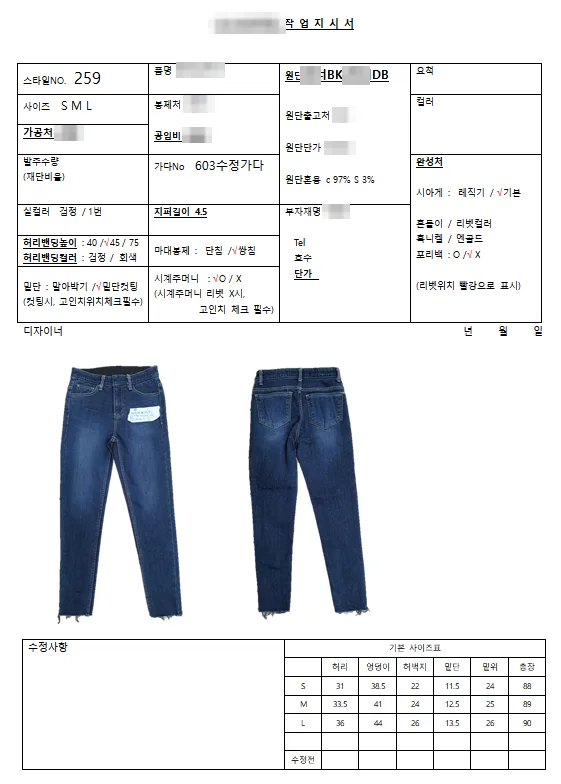
The first is the Word format I used for jeans. There is almost no costing on it. Instead it is packed with how the garment should be sewn and finished.
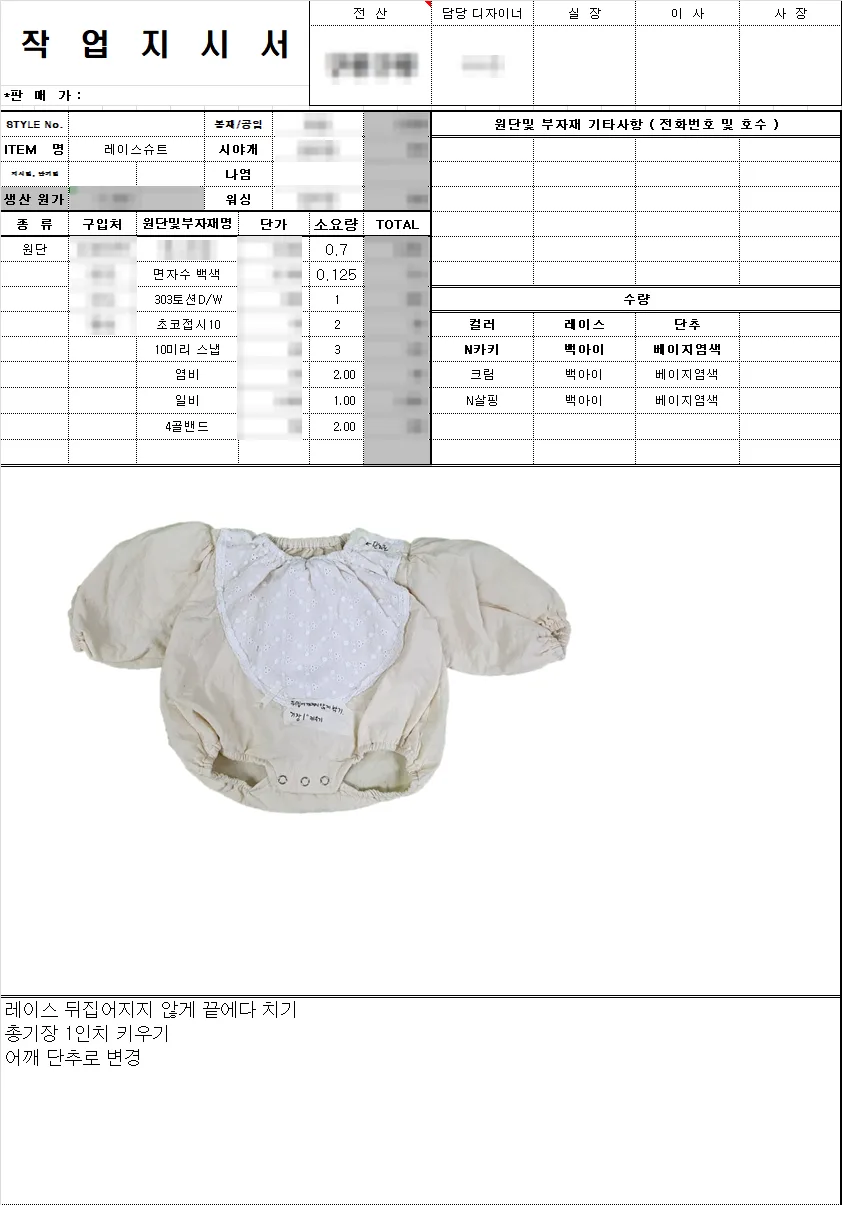
The second is an Excel format. Each fabric and trim gets its own row, and multiplying the amount used per piece by the unit price gives the production cost on the same sheet. The lower half holds a sample photo and the changes to make.
They look nothing alike, but they answer the same questions. What is it made of? How many, in which colors? How is it sewn and finished? What size is it? What is different from last time? I split those questions into six blocks.
1. The header: style number, item name, size range, pattern number
At the top goes everything that identifies this garment: the style number, the item name, the sizes it comes in, and the pattern number.
In Korean factories the pattern is often called the "gada," and on the jeans work order above you can see a line like "603 revised gada," the number of the corrected pattern. With a style number and a pattern number on the page, a reorder months later can be made exactly the same way without anyone guessing which version was final.
2. Fabric and trims: what, where from, and how much per piece
For the fabric, write the name, the color and the fiber content. On the jeans work order I wrote 97% cotton, 3% spandex. Then leave room for where the fabric is bought, with a phone number and the shop's stall number in the market. On the Excel sheet that is the box at the top right labeled "fabric and trim notes (phone and stall number)." If the fabric runs short or a reorder comes in, someone other than me should be able to walk in and buy the same roll.
There are more trims than most people expect. On the Excel work order, below the main fabric there is a row each for embroidered cotton, lace, buttons, snaps, elastic and the cost of dyeing the buttons. Labels and hang tags belong here too. Labels take about one to two weeks to make, so I order them while the sample is being made; otherwise they hold up the production schedule.
Every row also gets a consumption figure: how much of that material goes into one garment. For fabric this is usually called fabric consumption. On that sheet you can read figures like 0.7 for the main fabric, 0.125 for the embroidered cotton and 3 for the snaps. Write the unit next to fabric figures, whether yards or another measure, so nobody has to guess.
Multiply consumption by the number of pieces and you know how much fabric to order. Multiply it by the unit price and you have your material cost. I explain how to break a quote down line by line in how to compare clothing manufacturing quotes.
3. Quantities: by color, by size, and the trim colors that go with each
Do not write a single total. Break quantities down by color and by size, and include the ratio in which each size should be cut. On the jeans work order that is the "order quantity (cutting ratio)" box.
If there is more than one colorway, write down which trim color goes with each body color. On the Excel work order there is a small table: for each of the three body colors, which lace and which button color to use, with the buttons dyed beige.
Thread color works the same way. On the jeans work order I specified the thread as black, color number 1, and the waistband in black and gray. Whether the stitching should blend into the fabric or stand out is not a decision for the factory to make. I have worked with a brand that had me confirm every single trim color with them before production. Trim colors change how a garment reads that much.
4. Photos front and back, positions marked in color
“A photo or a drawing is fine, as long as it is easy for the factory to read.”
I wrote that when describing how I make children's clothing, and I still think so. You do not need to be good at technical drawings. Most of my own work orders use front and back photos of the sample or of a similar garment, and only now and then a line drawing.
What matters is having both the front and the back. You cannot tell where the back pockets sit or how the yoke above the seat is shaped from the front view.
Mark positions that are hard to describe in words directly on the photo, in color. The jeans work order has a line that says rivet positions are marked in red. Rivets are the small metal studs at the corners of the pockets. If the garment has a print or embroidery, its size and position need to be set as well; I place it on the actual sample to get it right.
5. Sewing and finishing: list the options and tick one
On the jeans work order this section takes up more space than any other. It has lines like these:
Every line follows the same pattern: the possible answers are written out first, and one is ticked. If you only write "double needle" in a blank space, the items you never mentioned stay invisible. When the options are printed on the page, a line with no tick jumps out at you, and the factory can see at a glance everything that has to be decided for this garment. Anything you leave undecided will be done the way that factory usually does it, and there is no guarantee that is the way you wanted.
Specs that are not on the standard list get written out separately, with the reason. For a unisex T-shirt I put durability first and added tape reinforcement around the neckline so it would keep its shape. Details like that tend to go missing unless they are written down.
Even a careful work order does not replace choosing the right factory. For a brand that needed meticulous sewing down to the last finish, I looked specifically for factories that communicate well and rarely make mistakes. Those factories tend to charge a little more per piece.
6. Size chart and revisions: in numbers, keeping the old numbers too
At the bottom of the jeans work order there is a basic size chart: waist, hip, thigh, hem opening, rise and total length, each given as a number for S, M and L. Below it there is one more row labeled "before revision," a place to keep the previous figure when a measurement is changed.
Agree on the unit and the way each point is measured. A waist measured all the way around and a waist measured flat across one side differ by a factor of two.
Write revisions as what, where and how much. The bottom box of the Excel work order has three lines:
“Stitch the lace down at the edge so it doesn't flip over”
“Lengthen the total length by 1 inch”
“Change the shoulder to a button closure”
Not "a bit longer," but "1 inch." The white note pinned to the middle of the sample in the photo says the same thing.
Seven checks before you send it
You can start without a work order
If this all feels like a lot, you do not have to write it all yourself. When you work with me, you can send just an image, send your own work order, or ask me to start from the design. A reference image, the feel you are after and a budget are enough: we choose the fabric together and I write the work order. I make clothes in Seoul and ship finished orders overseas by air or sea freight.
If you work with someone else, sending the six blocks above filled in will still save you a lot of back-and-forth with the factory.
Request a clothing production quote · More answers are in the clothing production FAQ.
Services by Botonglee